图像缩放
演示如何异步下载和缩放图像
主要使用QFuture,QPromise和QFutureWatcher来从网络下载图像集合并缩放他们,而不阻塞用户界面。
用到了链式调用,监视器。
应用程序包括以下步骤:
- 从用户指定的 URL 列表中下载图片。
- 缩放图片。
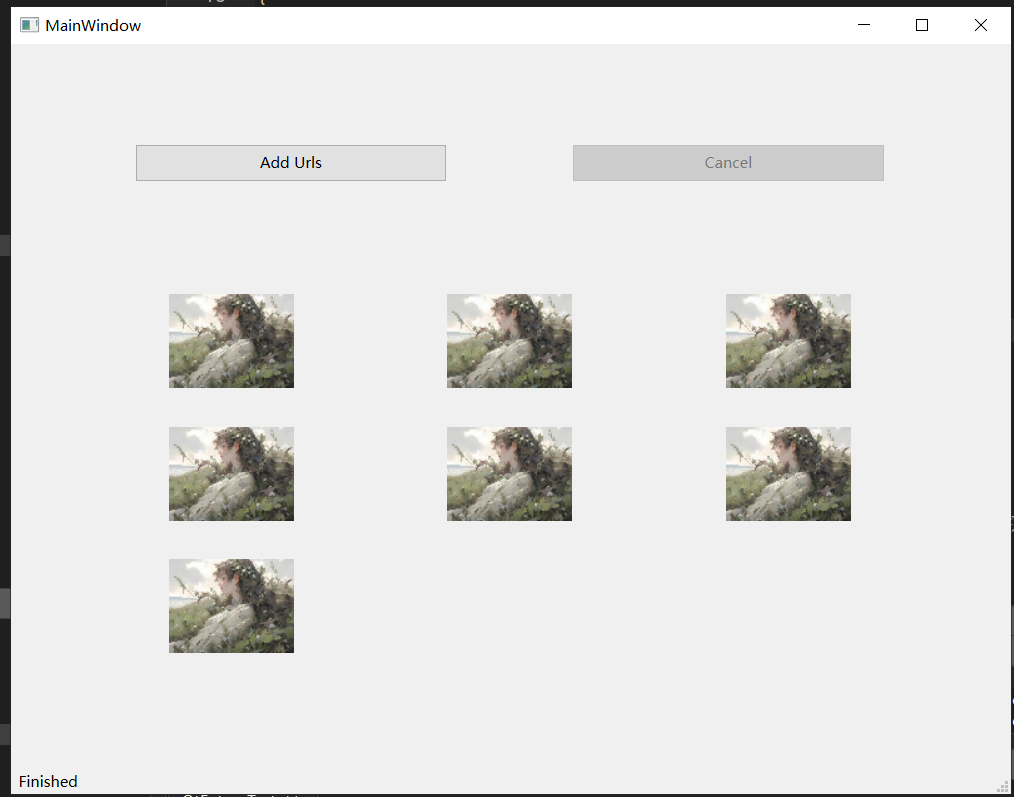
- 以网格布局显示缩放后的图片。
模态对话框
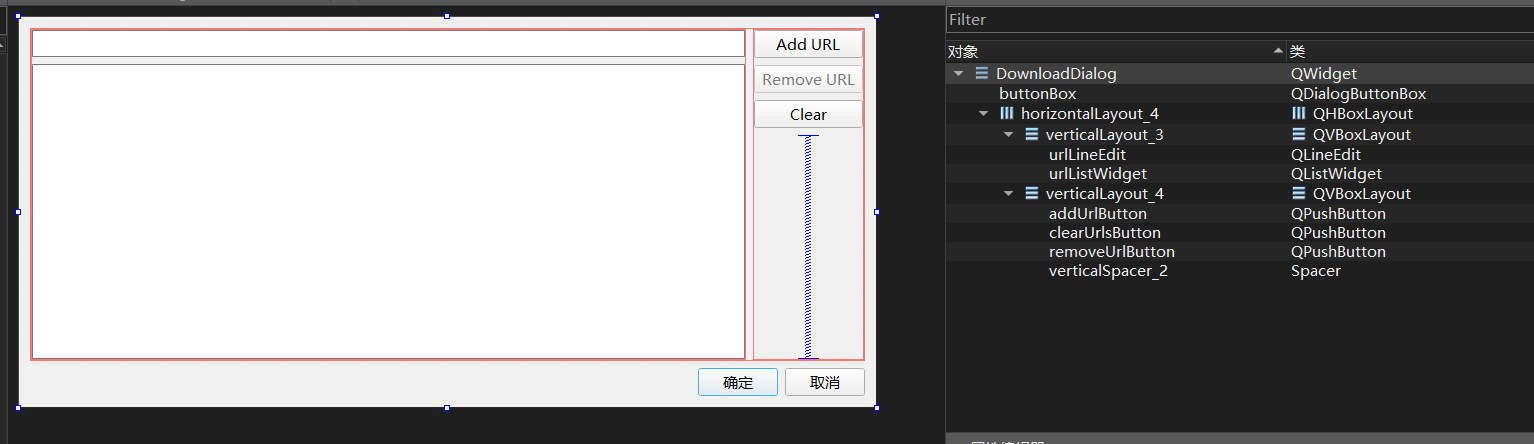
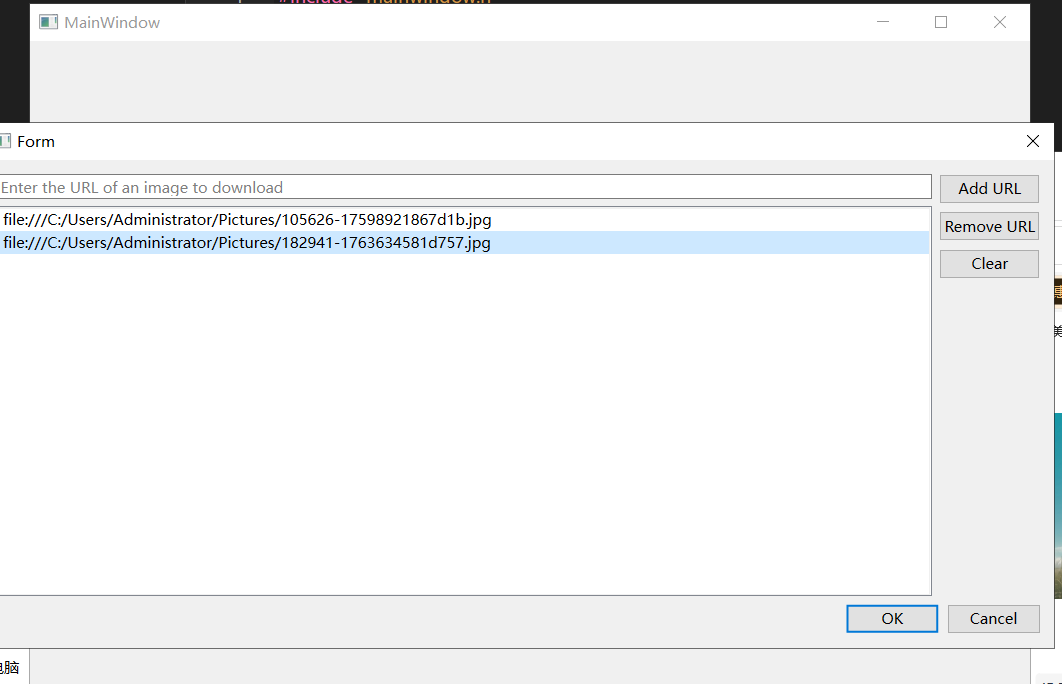
先来看一下点击添加url按钮后的dialog对话窗口
1
2
3
4
5
6
7
8
9
10
11
12
13
14
15
16
17
18
19
20
21
22
23
24
25
26
27
28
29
30
31
32
33
34
35
36
37
38
39
40
41
42
43
44
45
46
47
48
49
50
51
52
53
54
55
56
57
58
59
60
61
| DownloadDialog::DownloadDialog(QWidget *parent)
: QWidget(parent)
, ui(new Ui::DownloadDialog)
{
ui->setupUi(this);
ui->urlLineEdit->setPlaceholderText(tr("Enter the URL of an image to download"));
QObject::connect(ui->addUrlButton,&QPushButton::clicked,this,[this](){
const auto text = ui->urlLineEdit->text();
if(!text.isEmpty()){
ui->urlListWidget->addItem(text);
ui->urlLineEdit->clear();
}
});
QObject::connect(ui->urlListWidget,&QListWidget::itemSelectionChanged,this,[this](){
bool isnull = ui->urlListWidget->selectedItems().empty();
ui->removeUrlButton->setEnabled(!isnull);
});
上面已经qdeleteall后还访问了item这个野指针导致报错,修改为下述代码
QObject::connect(ui->removeUrlButton,&QPushButton::clicked,this,[this](){
QList<QListWidgetItem*> selectedItems = ui->urlListWidget->selectedItems();
for (QListWidgetItem* item : selectedItems) {
ui->urlListWidget->takeItem(ui->urlListWidget->row(item));
}
qDeleteAll(selectedItems);
ui->urlListWidget->clearSelection();
});
connect(ui->buttonBox, &QDialogButtonBox::accepted, this, &QDialog::accept);
connect(ui->buttonBox, &QDialogButtonBox::rejected, this, &QDialog::reject);
}
DownloadDialog::~DownloadDialog()
{
delete ui;
}
QList<QUrl> DownloadDialog::getUrls() const
{
QList<QUrl> list;
for(int i = 0;i<ui->urlListWidget->count();++i){
list.push_back(ui->urlListWidget->item(i)->text());
}
return list;
}
|
该窗口主要就两个任务,将输入的url存入listwidget并显示,以及将listwidget里面的url存到数据容器list里面方便主窗口调用以取数据。其他连接信号都是一些按键的信号。
要注意的是用到了qt语法糖qDeleteAll以删除容器中指向堆内存的对象,但不会清空容器本身,承担手动循环delete的效果。
只删除对象,不会从容器中移除元素(即保留空指针),需要手动clear、removeitem清空容器
clear() 清空容器(移除元素),但不释放内存;qDeleteAll 释放内存,但不清空容器
对话框的右下角ok与cancel按钮用的是buttonbox而非两个独立按钮组件,注意信号的绑定。
主窗口
我们希望点击主窗口add按钮后,出现模态对话框。
这里需要讲解一下模态对话框代码部分
if (downloadDialog->exec() == QDialog::Accepted) 这行代码有两个作用
exec() 是 QDialog(及子类,如 QFileDialog/ 自定义对话框)的核心方法,作用是:将对话框设置为模态(Modal):弹出后阻塞调用线程(通常是主线程),用户无法操作程序其他窗口,只能先处理这个对话框;== QDialog::Accepted``QDialog::Accepted 是 Qt 预定义的枚举值(本质是 int 类型,值为 1),代表「用户确认了对话框操作」(比如点击了 “确定”“下载”“保存” 等按钮);对应的反向枚举值是 QDialog::Rejected(值为 0),代表「用户取消了操作」(比如点击了 “取消” 按钮、关闭对话框右上角的 ×)。
异步批量下载图片
再讲解一下如何对拿到手的urls进行图片下载,也就是我们的download函数
| 类 |
角色 |
核心作用 |
QPromise<T> |
生产者 |
异步任务的 “结果写入者”:在任务执行过程中,写入结果、异常、取消状态,控制任务完成; |
QFuture<T> |
消费者 |
异步任务的 “结果读取者”:获取 QPromise 写入的结果、异常、状态,监听任务完成(不能写入,只能读); |
1
2
3
4
5
6
7
8
9
10
11
12
13
14
15
16
17
18
19
20
21
22
23
24
25
26
27
28
29
30
31
32
33
34
35
36
37
38
39
40
41
42
43
| QFuture<QByteArray> MainWindow::download(const QList<QUrl> &urls)
{
QSharedPointer<QPromise<QByteArray>> promise(new QPromise<QByteArray>());
promise->start();
for(auto url:urls){
QSharedPointer<QNetworkReply> reply(qnam.get(QNetworkRequest(url)));
replies.push_back(reply);
QtFuture::connect(reply.get(),&QNetworkReply::finished)
.then([=]{
if(promise->isCanceled()){
if(!promise->future().isFinished())
promise->finish();
return;
}
if(reply->error() !=QNetworkReply::NoError){
if(!promise->future().isFinished()){
throw reply->error();
}
}
promise->addResult(reply->readAll());
if(promise->future().resultCount()==urls.count())
promise->finish();
})
.onFailed([promise](QNetworkReply::NetworkError error){
const auto ex =std::make_exception_ptr(
std::runtime_error("Unknow error occurred while downloading."));
promise->setException(ex);
promise->finish();
});
}
return promise->future();
}
|
核心逻辑:
- 为每个 URL 发送网络 GET 请求(
QNetworkAccessManager::get);
- 异步监听每个请求的完成 / 错误状态;
- 所有请求完成后,通过
QPromise 汇总下载的二进制数据(QByteArray);
- 返回
QFuture,让调用方可以获取下载结果、监听下载状态。
我们将 promise 封装在QSharedPointer 中。由于连接到每个网络回复的处理程序之间共享 promise 对象,因此我们需要在多个地方同时复制和使用 promise 对象。因此,我们使用了QSharedPointer 。
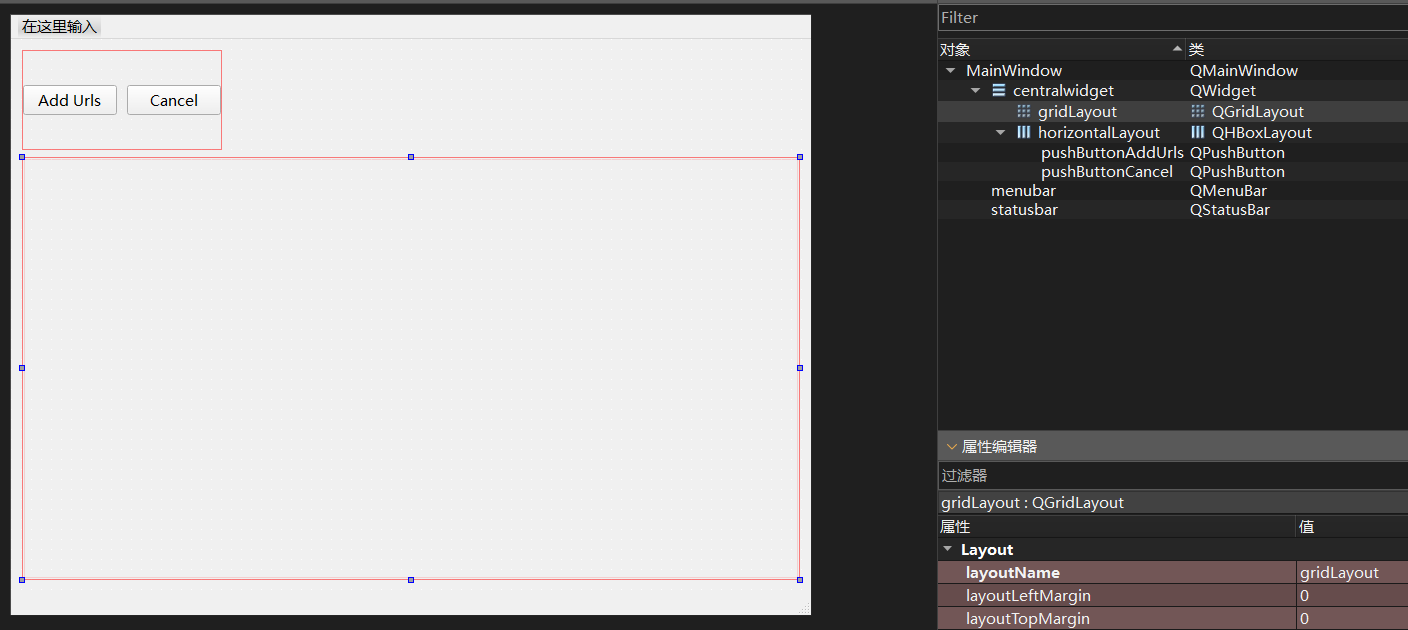
清空旧网格布局的旧图片并初始化新的网格布局
内存管理(重中之重)
takeAt 取出布局项(否则布局仍持有项的引用,删除会崩溃);第一次写的是itemAt仅返回布局中第 0 个项的指针,不会从布局中移除它;导致报错- 解除 widget 的父对象(
setParent(nullptr));
- 分别删除 widget 和布局项;
- 清空
labels 列表(避免保存已删除的野指针);
新创建的 QLabel 会自动将 gridLayout 的父窗口作为父对象(Qt 布局的特性),无需手动设置父对象,关闭窗口时会自动释放。
通过 qSqrt(count) + 1 计算行列数,让布局尽量接近正方形,比 “单行 / 单列” 展示更美观;
固定 QLabel 大小,避免不同尺寸的图片导致布局错乱。
labels 列表保存所有标签引用,后续只需遍历 labels,就能给每个标签设置对应的图片
1
2
3
4
5
6
7
8
9
10
11
12
13
14
15
16
17
18
19
20
21
22
23
24
25
26
27
28
29
30
31
32
33
| void MainWindow::initLayout(qsizetype count)
{
QLayoutItem* child;
while((child = ui->gridLayout->takeAt(0)) != nullptr){
child->widget()->setParent(nullptr);
delete child->widget();
delete child;
}
labels.clear();
const auto dim = int(qSqrt(qreal(count)))+1;
for(int i = 0;i<dim;++i){
for(int j = 0;j<dim;++j){
QLabel *imageLabel = new QLabel;
imageLabel->setFixedSize(100, 100);
ui->gridLayout->addWidget(imageLabel, i, j);
labels.append(imageLabel);
}
}
}
|
核心入口函数process
串联了「用户交互→批量下载→图片缩放→状态更新」全流程,核心逻辑:
- 清理旧状态(重置网络响应列表、禁用按钮);
- 弹出下载确认对话框,获取用户选择的图片 URL 列表;
- 初始化图片展示布局(根据 URL 数量生成对应网格);
- 异步批量下载图片(调用之前的
download 函数);
- 监听下载任务的状态(完成 / 取消 / 失败),执行对应逻辑【这里是用的链式调用来监视】:
- 下载成功:启动图片缩放异步任务【对这些异步任务用的是watcher来监视】;
- 下载取消 / 失败:更新状态提示、终止请求;
- 任务结束后重置按钮状态,恢复用户操作。
1
2
3
4
5
6
7
8
9
10
11
12
13
14
15
16
17
18
19
20
21
22
23
24
25
26
27
28
29
30
31
32
33
34
35
36
37
38
39
40
41
42
43
44
45
46
47
48
49
50
51
52
53
54
55
56
57
58
59
| 用户点击“开始处理” → 调用process()
↓
清理旧状态 → 弹出下载对话框 → 用户确认
↓
获取URL列表 → 初始化布局 → 启动异步下载(downloadFuture)
↓
┌───────────── 下载中 ─────────────┐
│ 分支1:下载成功 → then(缩放图片) │
│ 分支2:下载取消 → onCanceled(提示)│
│ 分支3:下载失败 → onFailed(处理错误)│
└───────────── 最终then ────────────┘
↓
重置按钮状态(禁用取消、启用添加URL)
void MainWindow::process()
{
replies.clear();
ui->pushButtonAddUrls->setEnabled(false);
if(downloadDialog->exec() == QDialog::Accepted){
const auto urls = downloadDialog->getUrls();
if(urls.empty())
return;
ui->pushButtonCancel->setEnabled(true);
initLayout(urls.size());
downloadFuture = download(urls);
statusBar->showMessage(tr("Downloading..."));
downloadFuture
.then([this](auto){
ui->pushButtonCancel->setEnabled(false);
updateStatus(tr("Scaling..."));
scalingWatcher.setFuture(QtConcurrent::run(MainWindow::scaled,downloadFuture.results()));
})
.onCanceled([this]{
updateStatus(tr("Download has been canceled."));
})
.onFailed([this](QNetworkReply::NetworkError error){
updateStatus(tr("Download finished with error: %1").arg(error));
abortDownload();
})
.onFailed([this](const std::exception &ex) {
updateStatus(tr(ex.what()));
})
.then([this]() {
ui->pushButtonCancel->setEnabled(false);
ui->pushButtonAddUrls->setEnabled(true);
});
}
}
|
对于缩放图片异步任务的监视器,信号绑定在主窗口构造函数
缩放函数
亮点在返回的是std::optional<QList>
- 返回
**std::nullopt**:不是 “没有图片数据”,而是 “有数据但解码失败(图片无效)”—— 明确表示 “缩放任务失败”;
- 返回空的
**QList<QImage>**(若 data 为空列表):表示 “没有图片数据需要处理”—— 是合法的 “空结果”;
- 返回非空
**QList<QImage>**:表示 “所有图片都解码 + 缩放成功”。
1
2
3
4
5
6
7
8
9
10
11
12
| MainWindow::OptionalImages MainWindow::scaled(const QList<QByteArray> &data)
{
QList<QImage> scaled;
for(const auto &imgData:data){
QImage image;
image.loadFromData(imgData);
if(image.isNull())
return std::nullopt;
scaled.push_back(image.scaled(100,100,Qt::KeepAspectRatio));
}
return scaled;
}
|
- 遍历过程中只要有一张图片解码失败,立即返回
std::nullopt,不再处理后续图片 —— 符合 “批量任务中‘一票否决’” 的常见逻辑(比如下载 10 张图,有 1 张损坏则整个缩放任务失败);
异步缩放任务监视器的槽函数scaledFinished()
演示
质数计算器
如何使用QFutureWatcher 类和filteredReduced函数创建一个交互式非阻塞 QtWidgets 应用程序。 Qt Concurrent.通过该示例,用户可以创建一个可调整大小的整数QList 。程序将检查列表中的质数,并显示找到的质数总数。
先看ui
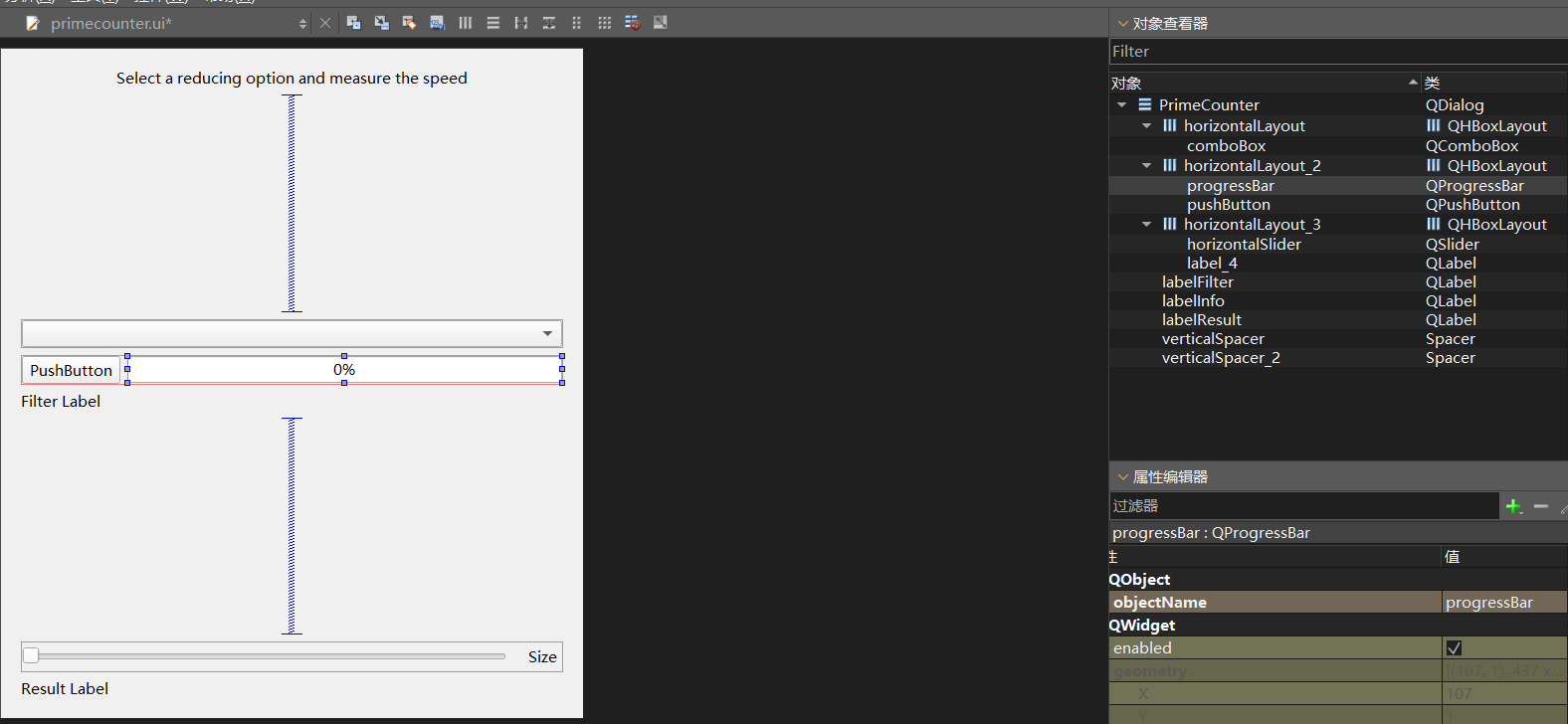
再看头文件
1
2
3
4
5
6
7
8
9
10
11
12
13
14
15
16
17
18
19
20
21
22
23
24
25
26
27
28
29
30
31
| #ifndef PRIMECOUNTER_H
#define PRIMECOUNTER_H
#include<QtConcurrent>
#include <QDialog>
namespace Ui {
class PrimeCounter;
}
class PrimeCounter : public QDialog
{
Q_OBJECT
using Element = unsigned long long;
public:
explicit PrimeCounter(QWidget *parent = nullptr);
~PrimeCounter();
private:
static bool filterFunction(const Element &ele);
static void reduceFunction(Element &out,const Element &value);
void fileElementList(unsigned int count);
Ui::PrimeCounter* setupUi();
private slots:
void start();
void finish();
private:
Ui::PrimeCounter *ui;
QList<Element> elementList;
QFutureWatcher<Element> watcher;
QtConcurrent::ReduceOptions currentReduceOpt;
QElapsedTimer timer;
QThreadPool pool;
unsigned int stepSize;
};
|
ReduceOptions主要是控制mappedReduced或者filterReduced的reduce归约阶段行为,有多种枚举值,且可以并列。比如UnorderReduced|SequentialReduce。这是两个默认,谁最先mapped/filter就去reduce,且同一线程归约;而ParallelReduce是指归约操作也多线程执行(需保证归约函数线程安全,如加锁),仅适合归约逻辑耗时的场景;
start函数与按钮的点击信号连接,但这里需要注意的是该按钮为一键两用按钮, 不是普通按钮,而是被设置为 setCheckable(true)(可选中 / 切换),所以在start函数内部需要通过if (ui->pushButton->isChecked())决定按下走什么逻辑,抬起走什么逻辑
也没什么复杂的,定时器用来异步任务开始前start,结束后timer.elasped得到任务耗时然后显示ui上。
点击开始按钮后,根据用户选择归约模式与范围,初始化元素列表,并发对每一个元素进行质数检测。是质素则归约函数的首个输出参数out值就加1.
源文件
1
2
3
4
5
6
7
8
9
10
11
12
13
14
15
16
17
18
19
20
21
22
23
24
25
26
27
28
29
30
31
32
33
34
35
36
37
38
39
40
41
42
43
44
45
46
47
48
49
50
51
52
53
54
55
56
57
58
59
60
61
62
63
64
65
66
67
68
69
70
71
72
73
74
75
76
77
78
79
80
81
82
83
84
85
86
87
88
89
90
91
92
93
94
95
96
97
98
99
100
101
102
103
104
105
106
107
108
109
110
111
112
113
114
115
116
117
118
119
120
121
122
123
124
125
126
127
128
129
130
131
132
133
134
135
136
137
138
139
140
141
142
143
| #include "primecounter.h"
#include "ui_primecounter.h"
PrimeCounter::PrimeCounter(QWidget *parent)
: QDialog(parent),stepSize(100000)
, ui(setupUi())
{
QObject::connect(ui->pushButton,&QPushButton::clicked,this,[this]{start();});
QObject::connect(&watcher,&QFutureWatcher<Element>::progressRangeChanged,
ui->progressBar,&QProgressBar::setRange);
QObject::connect(&watcher,&QFutureWatcher<Element>::finished,
this,[this]{finish();});
QObject::connect(&watcher,&QFutureWatcher<Element>::progressValueChanged,
ui->progressBar, &QProgressBar::setValue);
}
PrimeCounter::~PrimeCounter()
{
watcher.cancel();
delete ui;
}
bool PrimeCounter::filterFunction(const Element &ele)
{
if(ele<=1)
return false;
for(Element i = 2;i*i<=ele;++i)
if(ele % i ==0)
return false;
return true;
}
void PrimeCounter::reduceFunction(Element &out, const Element &value)
{
Q_UNUSED(value);
++out;
}
void PrimeCounter::finish(){
if(watcher.isCanceled())
return;
auto elapsedTime = timer.elapsed();
ui->progressBar->setValue(0);
ui->comboBox->setEnabled(true);
ui->pushButton->setChecked(false);
ui->pushButton->setText(tr("Start"));
ui->labelFilter->setText(
tr("Filter '%1' took %2 ms to calculate").arg(ui->comboBox->currentText())
.arg(elapsedTime));
ui->labelResult->setText(
tr("Found %1 primes in the range of elements").arg(watcher.result()));
}
Ui::PrimeCounter* PrimeCounter::setupUi(){
Ui::PrimeCounter *setupUI = new Ui::PrimeCounter;
setupUI->setupUi(this);
setModal(true);
connect(setupUI->horizontalSlider, &QSlider::valueChanged,
this, [setupUI, this] (const int &pos) {
setupUI->labelResult->setText("");
setupUI->labelSize->setText(tr("Elements in list: %1").arg(pos * stepSize));
});
setupUI->horizontalSlider->setValue(30);
emit setupUI->horizontalSlider->valueChanged(30);
setupUI->comboBox->insertItem(0, tr("Unordered Reduce"), QtConcurrent::UnorderedReduce);
setupUI->comboBox->insertItem(1, tr("Ordered Reduce"), QtConcurrent::OrderedReduce);
setupUI->comboBox->setCurrentIndex(0);
currentReduceOpt = QtConcurrent::UnorderedReduce;
setupUI->labelFilter->setText(tr("Selected Reduce Option: %1")
.arg(setupUI->comboBox->currentText()));
auto comboBoxChange = [this, setupUI](int pos) {
currentReduceOpt = setupUI->comboBox->itemData(pos).value<QtConcurrent::ReduceOptions>();
setupUI->labelFilter->setText(tr("Selected Reduce Option: %1")
.arg(setupUI->comboBox->currentText()));
};
connect(setupUI->comboBox, &QComboBox::currentIndexChanged, this, comboBoxChange);
return setupUI;
}
void PrimeCounter::fillElementList(unsigned int count)
{
auto prevSize = elementList.size();
if(prevSize == count)
return;
auto startVal = elementList.empty()?1:elementList.back()+1;
elementList.resize(count);
if (elementList.begin() + prevSize < elementList.end())
std::iota(elementList.begin() + prevSize, elementList.end(), startVal);
}
void PrimeCounter::start()
{
if(ui->pushButton->isChecked()){
ui->comboBox->setEnabled(false);
ui->pushButton->setText(tr("Cancel"));
ui->labelResult->setText(tr("Calculating..."));
ui->labelFilter->setText(tr("Selected Reduce Option:%1").arg(ui->comboBox->currentText()));
fillElementList(ui->horizontalSlider->value()*stepSize);
timer.start();
watcher.setFuture(
QtConcurrent::filteredReduced(
&pool,
elementList,
filterFunction,
reduceFunction,
currentReduceOpt|QtConcurrent::SequentialReduce));
}else {
watcher.cancel();
ui->progressBar->setValue(0);
ui->comboBox->setEnabled(true);
ui->labelResult->setText(tr(""));
ui->pushButton->setText(tr("Start"));
ui->labelFilter->setText(tr("Operation Canceled"));
}
}
|
踩坑:列表初始化要看成员变量的声明顺序
而非列表书写顺序!!!!
如下原先ui声明在stepsize前面,但是setUpUi()里面用到了stepsize变量,因列表初始化顺序由类中声明顺序决定,所以此时stepsize还没有被声明,导致初始化出来的ui全是问题。
1
2
3
4
5
6
7
8
9
| .h
private:
Ui::PrimeCounter *ui;
/.../
unsigned int stepSize;
PrimeCounter::PrimeCounter(QWidget *parent)
: QDialog(parent),stepSize(100000)
, ui(setupUi())
|
将ui声明放置最后(一般建议都这么做),程序正常运行
字数统计
演示如何使用mappedReduced来计算文件集合中的字数